



Blackmagic UltraStudio Mini 12G — Thunderbolt 4 capture, playback and live replay
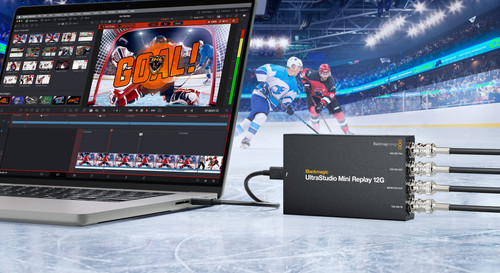
Blackmagic Design has released the UltraStudio Mini 12G family — three Thunderbolt 4 capture and playback boxes built for broadcast work. The UltraStudio Mini Recorder 12G captures from 12G-SDI and HDMI. The UltraStudio Mini Monitor 12G plays back to 12G-SDI and HDMI. The UltraStudio Mini Replay 12G does both at once over 12G-SDI, and adds independent fill and key outputs plus a dedicated monitoring output. All three work in every SD, HD and Ultra HD standard up to 2160p60.
Thunderbolt 4 carries video and power down a single cable, with the bandwidth for deeper bit depths and the 4:2:2:4 and 4:4:4:4 frame buffers that alpha work needs. There's hardware support for both RGBA and YUVA internally, so RGBA graphics transcode automatically to YUV 4:2:2:4 on the fill and key outputs in full 10-bit precision. The two SDI outputs then feed a production switcher where the graphics key over video, with the key output handling the blending on transparent elements. That's what separates these from a plain capture box — they're built for broadcast graphics and stingers.
The Replay model is the one to look at if you cut live sport. Its Thunderbolt link is bidirectional, so it captures, processes and plays back in real time: connect the input to your switcher's multi-view, then replay with auto stingers out the fill and key outputs. It supports the live action replay features in DaVinci Resolve 20. That same bidirectional path is what lets a computer sit in the chain as a real time graphics or AI processor.
All three use the DeckLink API, so almost any video software will see them — OBS for live streaming, DaVinci Resolve, Final Cut Pro, Media Composer and Premiere Pro for editing, plus Fusion, After Effects and Photoshop for compositing. Blackmagic's Media Express is included for straight capture and playback to file, and there's a free developer SDK for Mac, Windows and Linux if you need to build something of your own. The Recorder also handles the less glamorous jobs well: archiving off old broadcast decks, or pulling in a game console feed.
NZ pricing (inc GST)
- UltraStudio Mini Recorder 12G — $749
- UltraStudio Mini Monitor 12G — $749
- UltraStudio Mini Replay 12G — $925
Key features
- Thunderbolt 4 — video, playback and power over one cable
- 12G-SDI and HDMI on the Recorder and Monitor; 12G-SDI on the Replay
- All SD, HD and Ultra HD standards up to 2160p60
- 10-bit capture and playback
- Independent 12G-SDI fill and key outputs on the Replay and Monitor
- Dedicated 12G-SDI monitoring output on the Replay
- Simultaneous capture and playback on the Replay
- Live action replay support in DaVinci Resolve 20
- RGBA and YUVA frame buffers with automatic alpha conversion to key
- Switchable level A and level B for 3G-SDI sources
- DeckLink API — works with most video software
- Blackmagic Media Express included
- Free developer SDK for Mac, Windows and Linux
If you're weighing up which of the three suits your setup, or you'd like to see the Replay running auto stingers before you commit to one, give us a call on +64 9 525 0788 or email sales@dvt.co.nz and we'll talk it through.